Bluehost AI Builder turns a short description of your business into a working website, and increasingly into small web apps such as booking pages, quote forms and customer portals. Bluehost launched it in November 2026 with a free plan that has no end date, credit-based paid plans and built-in tools for forms, bookings and user accounts.
This Bluehost AI Builder review covers what the product does now, what it costs, how its credits work, what to check before you commit and who it suits best. Product facts come from Bluehost's own pages, checked on 11 November 2026. Our findings from building a test site are kept separate, so you can tell what Bluehost claims from what we saw.
Quick verdict
Verdict: Bluehost AI Builder suits a small service business that wants a simple site or booking app built through chat, without learning WordPress. It's a weaker fit if you need a store in the same tool, an annual price or a documented way to move your site. This verdict draws on Bluehost's documentation and our own test of the first build.
- What it does: builds a website or web app from a prompt, hosts it, and lets you edit it by chat.
- Main strengths: $0 to start, no credit card; hosting that never uses credits; forms, bookings, user accounts and an admin panel on every plan; 24/7 human support on every plan, per Bluehost.
- Main limitations: your own domain needs a paid plan (paid plans from $20/mo), billed monthly; credits expire after 30 days; no documented code export; AI Builder doesn't support ecommerce yet, so for selling products Bluehost points you to Bluehost AI Store.
- Best for: service businesses, freelancers and first-time site owners who want something live quickly.
Try Bluehost AI Builder free. We earn a commission if you sign up through this link.
What is Bluehost AI Builder?
Bluehost AI Builder is a chat-based tool that builds and hosts a website from a plain-language description. You describe the business, optionally upload a logo or photos or share a reference site, answer a few guided questions, and the AI produces a first version that you refine by asking for changes. Bluehost hosts the result, and paid plans let you put it on your own domain.
Bluehost is a web host owned by Newfold Digital, whose other brands include HostGator, Network Solutions and Yoast, according to Bluehost's launch announcement. Bluehost describes AI Builder as a conversational AI agent that isn't WordPress-based, which separates it from the company's long-running WordPress hosting.
Bluehost AI Builder or Bluehost AI Store?
- Bluehost AI Builder (the subject of this review) is for anyone who wants to describe a website or web app and let the AI build it. It doesn't support ecommerce yet.
- Bluehost AI Store is Bluehost's separate product for selling products online, built on WordPress and WooCommerce.
If you specifically want WordPress, Bluehost's WordPress hosting is a separate route.
AI Builder replaces Bluehost's previous builder
Bluehost announced AI Builder on 10 November 2026 at its ELEVATE small business summit, adding web apps, a back office and a free plan. AI Builder replaces Bluehost's previous AI builder for new customers; existing customers stay on the previous builder. Some Bluehost help articles still describe the earlier product, including a 14-day trial, so if anything you read differs from what you see in AI Builder, go by the product itself.
Key features of Bluehost AI Builder
The features below are as listed on Bluehost's AI Builder page and in its AI Builder launch post, checked on 11 November 2026, unless we say otherwise.
Prompt-to-site generation with guided questions
You start by describing the business in a sentence or two. You can add a logo or photos (PNG, JPG or WebP, up to 5 MB each) or a reference site; Bluehost says the AI uses a reference site only for layout, colour and tone, and doesn't copy its text or images. The AI then asks clarifying questions, which don't use credits.
Editing by chat
You change the site by asking for changes in plain language. According to Bluehost's FAQ, changes appear in a live preview, save automatically and stay private until you publish. Bluehost says you can review desktop, tablet and mobile views, and keep changing design, copy, images or layout in the same conversation after publishing.
Built-in business tools
Every plan, including Free, lists forms and data storage, bookings and scheduling, user accounts and roles, and an admin panel. The launch post adds that form submissions are saved with email alerts to your team, that bookings can connect to Google Calendar, and that the builder can create customer portals, quote request forms, directories and internal tools. These are browser-based web apps: AI Builder doesn't publish native apps to the Apple App Store or Google Play.
SEO basics
Bluehost says the builder writes page titles, meta descriptions, headings and image alt text. Bluehost is clear that rankings depend on content, location and competition, and that no builder can guarantee a position.
We didn't publish our test site, so we haven't checked how AI Builder pages are indexed. If search traffic matters to you, check a published page's robots settings, sitemap and structured data before you rely on it.
Hosting, domains and support
Hosting is included on every plan and never uses credits, so a published site stays online when you run out. The Free plan publishes on a Bluehost subdomain (yourname.app.bluehost.ai); connecting your own domain requires a paid plan, and registering or renewing a domain is separate. Bluehost says real people help 24/7 on every plan, including Free, during the build and after launch, with changes, domains, email and hosting.
What Bluehost doesn't say: we couldn't find storage or bandwidth limits, a money-back guarantee or a code export option in Bluehost's AI Builder documentation when we checked on 11 November 2026.
Bluehost AI Builder pricing
Bluehost AI Builder is $0 to start, no credit card, and paid plans from $20/mo. The plans differ mainly in how many AI credits you get and whether you can use your own domain. Plan details below are from Bluehost's AI Builder page, checked on 11 November 2026.
Start on AI Builder Free. We earn a commission if you sign up through this link.
| Plan | AI credits | What it includes |
|---|---|---|
| AI Builder Free | 5 a day, up to 30 a month | Unlimited websites and apps, forms, bookings, user accounts, admin panel, hosting and 24/7 help; publishes on a Bluehost subdomain |
| AI Builder Lite | Up to 100 a month, no daily limit | Everything in Free, plus custom domains, removal of the Bluehost badge and on-demand credit top-ups |
| AI Builder Standard | 200 a month | Everything in Lite, with twice the monthly credits |
| AI Builder Pro | 400 a month | Everything in Lite, with four times the monthly credits |
Paid plans are billed monthly and are added by upgrading inside AI Builder. On paid plans, you can also buy top-ups of 50, 100 or 200 credits.
How credits work
One message to the AI uses one credit, whatever its size. The AI's questions are free, hosting never uses credits, and plan credits and top-ups expire after 30 days. Running out pauses new changes, not the live site.
Free plan: up to 30 credits a month (5 a day)
Lite: up to 100 credits a month
A site that took 60 messages to build and polish in its first month would exceed the Free plan's 30-credit cap but fit within Lite's 100. A long request costs the same as a short one, so group related changes into one message.
Hands-on experience: building a website with Bluehost AI Builder
To test Bluehost AI Builder, the KampaignLab team asked it to build a site for KampaignLab itself: a publication homepage for a marketing, SaaS and AI blog. We ran the test on the Free plan in November 2026, from an existing Bluehost account, and the project appears in our dashboard as "KampaignLab Publication". Below is what we saw at each stage, followed by what our test didn't cover.
1. Onboarding and the first prompt
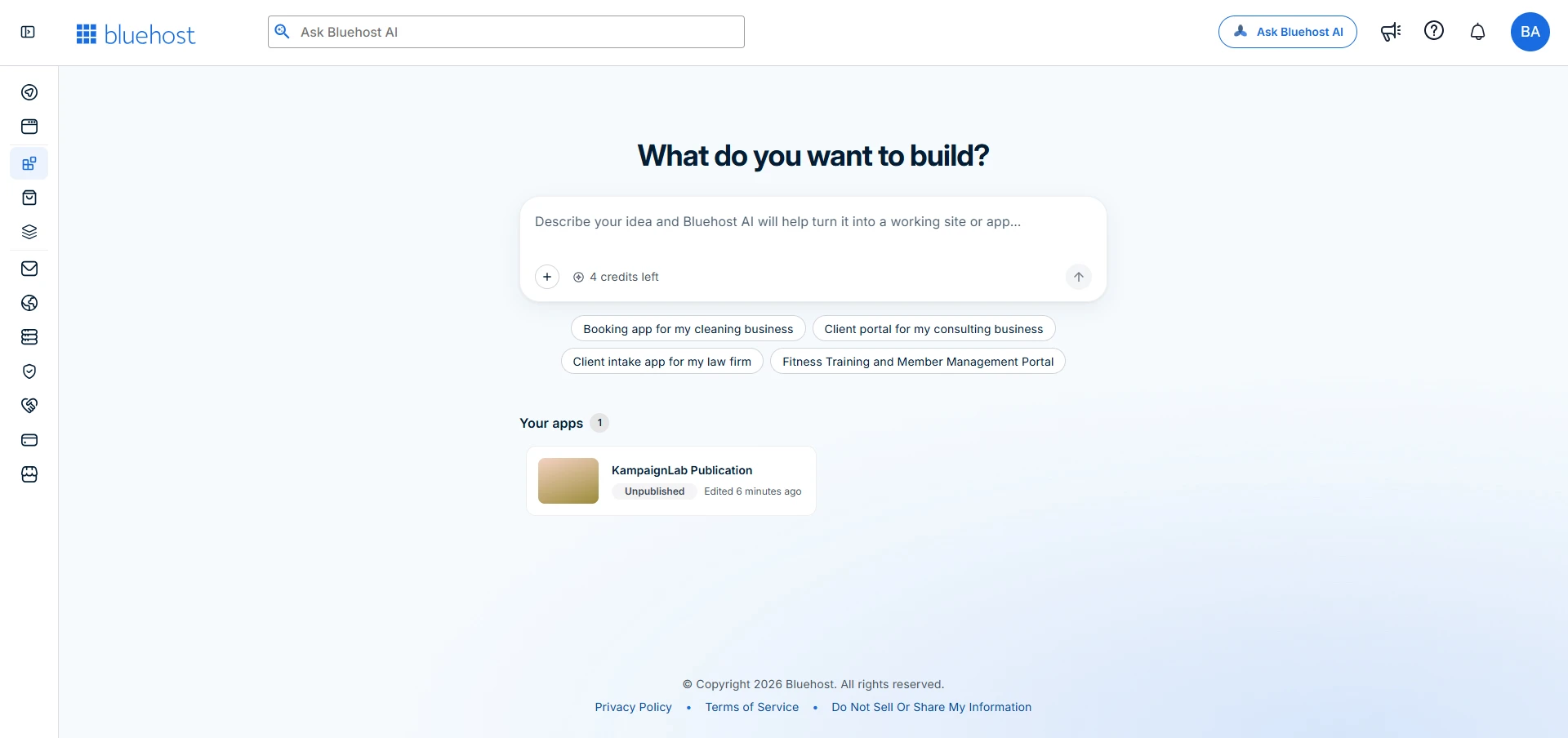
Because we were already signed in, the builder opened inside the Bluehost account dashboard. The start screen asks "What do you want to build?" above a single prompt box with a + button for attachments and a live credit counter. The four suggested starting points are all apps rather than brochure sites: a booking app for a cleaning business, a client portal for a consulting business, a client intake app for a law firm, and a fitness member portal. We didn't test sign-up as a new visitor; Bluehost says new users create an account with Google, Apple, GitHub or email, with no card needed.
Our prompt asked for a "premium, modern, professional" site and listed things to avoid, such as unnecessary animations. Writing the brief as a short specification rather than a single sentence is what Bluehost's own help guide recommends. Once the brief was complete, the AI replied, "I've saved your request. The build starts next."
2. Watching the build
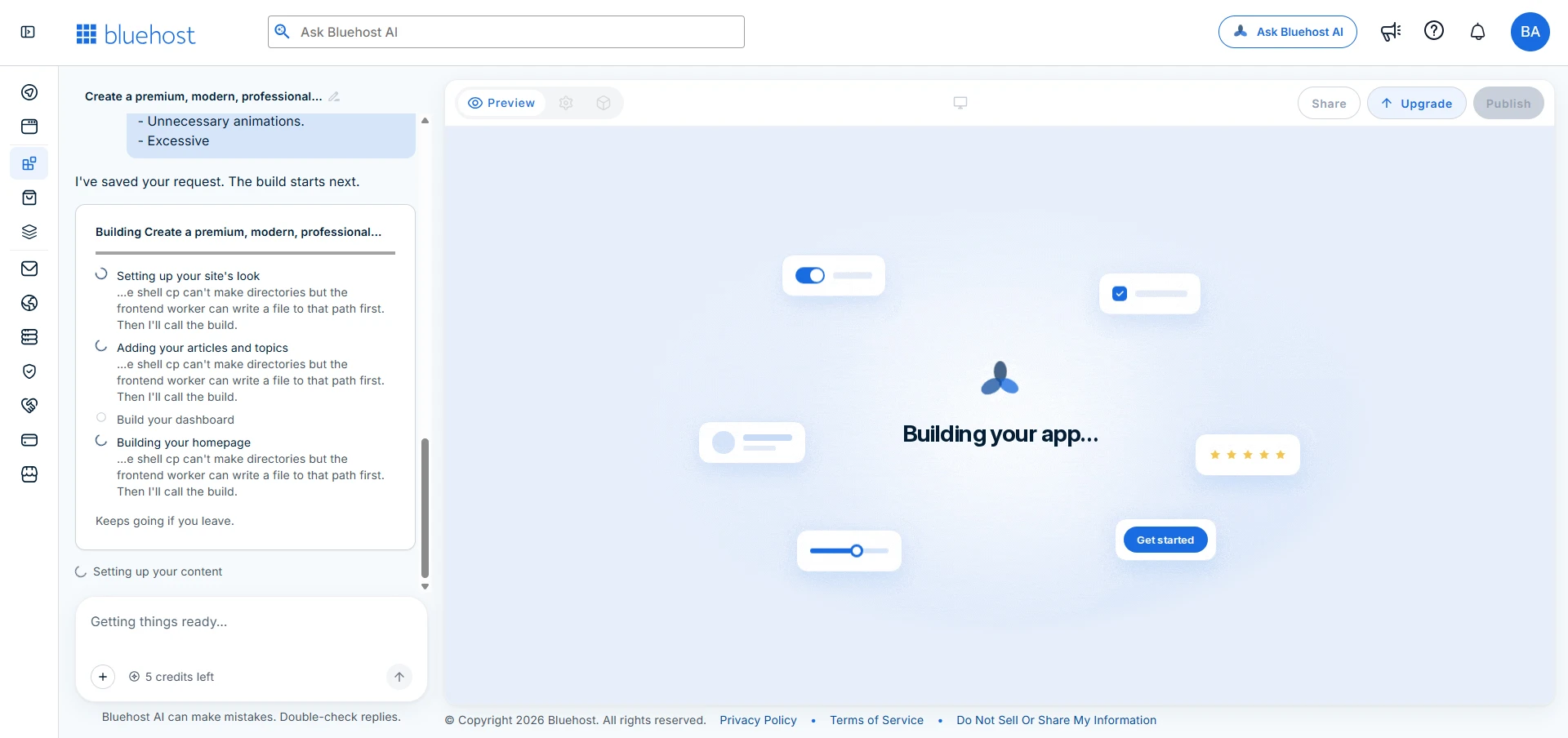
The build screen pairs a chat panel with a live preview, with Preview, Share, Upgrade and Publish controls along the top; Publish stays greyed out during the build. A checklist tracks each stage, from setting up the site's look to building a dashboard and the homepage. A note says the build "keeps going if you leave", and a line under the chat box warns that "Bluehost AI can make mistakes".
One rough edge: the progress list displayed what appear to be the AI agent's internal working notes, short technical messages about file paths. They didn't stop the build, but they mean nothing to a non-technical user and look unfinished. Our credit balance read 5 during the build and 4 afterwards, consistent with Bluehost's rule of one credit per message.
3. The AI-generated design
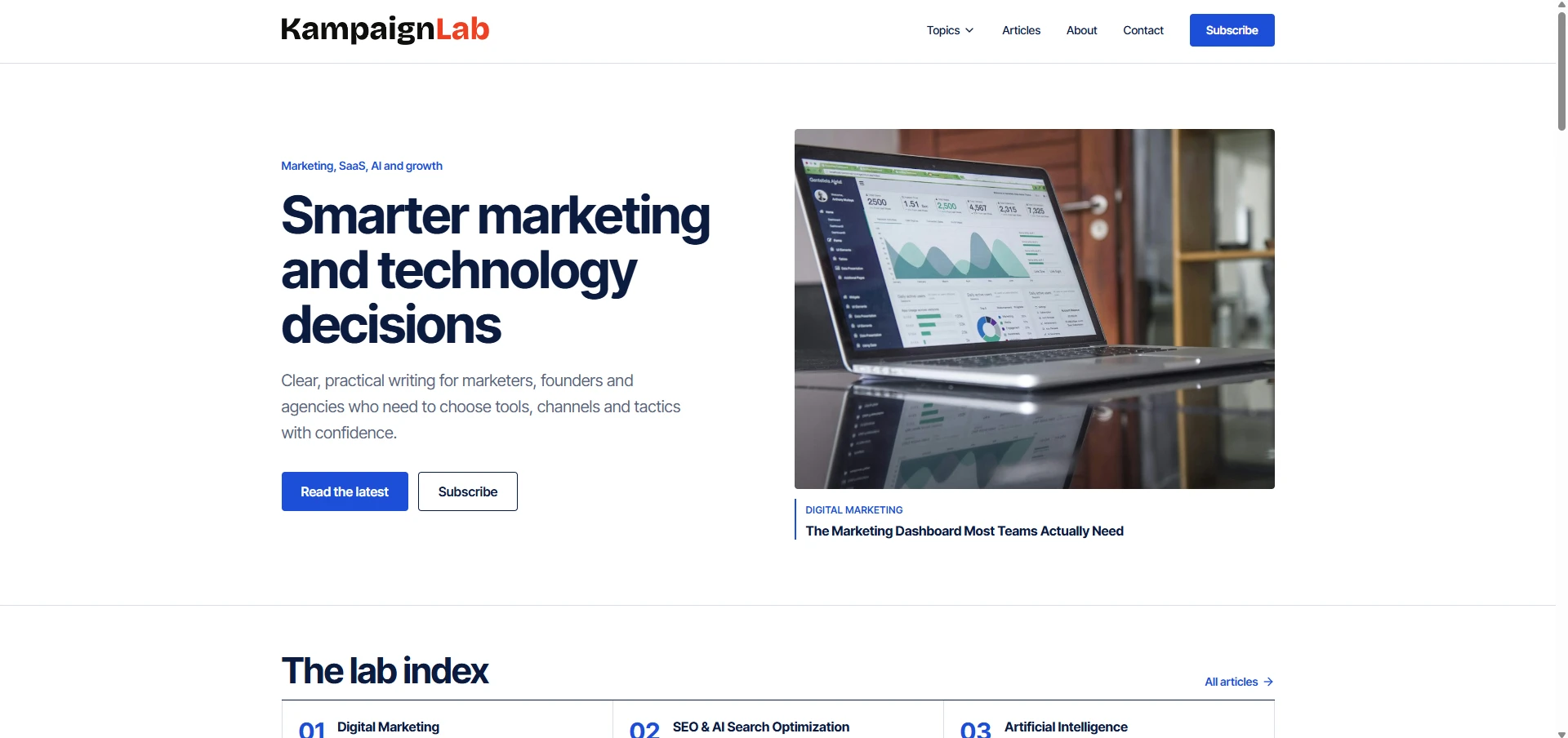
The first version was a clean, editorial homepage that suited the brief: a KampaignLab wordmark with "Lab" in red, a simple navigation bar with a Subscribe button, and a hero with the headline "Smarter marketing and technology decisions", two calls to action and a large photo of a laptop showing an analytics dashboard. Below sit a featured-article card and a numbered "lab index" of topics.
The copy was on-brand and usable as a starting point, but not all of it was real. The featured article, "The Marketing Dashboard Most Teams Actually Need", isn't one we've published, and the topics only approximate our actual categories. That's quick to fix, but every headline, link and claim needs checking before launch, as Bluehost's on-screen warning suggests.
What our test didn't cover
We stopped after the first version and didn't publish the site. This review therefore has no first-hand results for chat editing, mobile display, publishing, custom domains, forms, bookings, page speed or support; where those come up, the information is Bluehost's, not ours. If you're evaluating the builder yourself, try them on the free plan before you upgrade: ask for three or four specific changes and count the credits they use, check the site on a phone, and send a test submission through a form.
Customization, performance and site management
Editing is conversation-first: you describe a change rather than hunt for a setting. Each request uses a credit, and precision depends on the AI understanding which element you mean. Because AI Builder isn't WordPress, there's no plugin or theme library; what you can add is what the AI can build, plus the forms, bookings and accounts Bluehost includes.
Performance and mobile: Bluehost says AI Builder sites are mobile-responsive. We didn't publish our test site, so we haven't measured its speed or checked it on a phone. Before you commit, publish a test page on the free plan and run it through Google PageSpeed Insights.
Management: Bluehost says sites, apps and team members sit under one account, with an admin panel for submissions, bookings and user roles. For a long-term site, portability matters more: we couldn't find a documented way to export an AI Builder site or move it to another host, so ask Bluehost support first.
Bluehost AI Builder pros and cons
Pros
- $0 to start, no credit card, and the Free plan has no end date, so you can see a real result before paying.
- Hosting never uses credits; running out pauses edits, not your site.
- Forms, bookings, user accounts and an admin panel on every plan, including Free.
- Real people help 24/7 on every plan, including Free, according to Bluehost.
- Guided questions are free, so setting up the brief costs nothing.
- In our test, the first build followed a detailed style brief closely, and the build keeps running if you leave the page.
Cons
- Your own domain needs a paid plan (paid plans from $20/mo), billed monthly with no annual discount shown.
- Credits expire after 30 days, and a one-word change costs the same as a long request.
- No documented code export or migration route.
- No ecommerce yet: for selling products, Bluehost points you to Bluehost AI Store.
- In our test, the build screen showed the AI's internal technical notes, and the first version included an invented featured article that needed replacing.
Who should use Bluehost AI Builder?
- Service businesses that need a site plus a booking or enquiry form, such as a tradesperson, consultant, tutor or salon.
- Freelancers and creatives who want a portfolio live this week, not this quarter.
- First-time site owners who want to see the result before paying anything.
- Existing Bluehost customers who want one account for domain, hosting and support.
- Marketers prototyping a campaign landing page or a simple internal tool.
Who should avoid it?
- Online stores: AI Builder doesn't support ecommerce yet. Bluehost AI Store is Bluehost's product for selling, so start there.
- Teams that need WordPress: if you rely on plugins, themes or a developer handover, Bluehost's WordPress hosting is the better route.
- Anyone who needs to own the code: AI Builder doesn't document a code export, so confirm with Bluehost support first if you may want to move the site later.
- Budget-first buyers over several years: paid plans are billed monthly with no annual discount shown, so the cost of a site on your own domain adds up over several years, before the domain itself.
- Search-led businesses that need technical SEO control, until you've confirmed the site's indexing settings, sitemap and structured data meet your needs.
Is Bluehost AI Builder worth it in 2026?
For a small service business, yes, if three things are true: you'll use the bookings or forms, you value human support, and you're comfortable with the site living on Bluehost. The free plan makes it low-risk to find out. It's harder to justify a paid plan purely for a brochure site on your own domain, and for selling products, Bluehost AI Store is the better fit. AI Builder launched in November 2026, so expect features to change; check the current plan details inside AI Builder and ask support about export before you commit.
Frequently asked questions
What is Bluehost AI Builder?
Bluehost AI Builder is a chat-based tool that builds and hosts a website or simple web app from a plain-language description of your business. You can add a logo, photos or a reference site, answer a few guided questions, then refine the result by asking for changes in chat. Bluehost says it is not built on WordPress.
Is Bluehost AI Builder free?
Yes, with limits. Bluehost AI Builder is $0 to start, no credit card. The Free plan gives you 5 credits a day, up to 30 a month, with unlimited websites and apps published on a Bluehost subdomain (yourname.app.bluehost.ai). Using your own domain and removing the Bluehost badge require a paid plan.
How much does Bluehost AI Builder cost?
Bluehost AI Builder is $0 to start, no credit card, and paid plans from $20/mo. The paid plans, AI Builder Lite, Standard and Pro, add more monthly AI credits and let you use your own domain. Registering or renewing a domain is separate.
How do credits work in Bluehost AI Builder?
Each message you send to the AI uses one credit, whatever its length. The AI's clarifying questions are free, hosting never uses credits, and plan credits and top-ups expire after 30 days.
Is Bluehost AI Builder built on WordPress?
No. Bluehost describes AI Builder as a conversational AI agent that is not WordPress-based, so no WordPress knowledge is needed. Bluehost AI Store, Bluehost's separate product for selling online, is built on WordPress and WooCommerce.
Can I use my own domain with Bluehost AI Builder?
Yes, on a paid plan. AI Builder Lite, Standard and Pro let you connect your own domain inside the builder; registering or renewing a domain is separate. The Free plan publishes on a Bluehost subdomain.
Can I sell products with Bluehost AI Builder?
Not at the moment. Bluehost says AI Builder doesn't support ecommerce yet. For selling products online, Bluehost points customers to Bluehost AI Store, which is built on WordPress and WooCommerce. AI Builder itself focuses on websites, forms, bookings and customer portals.
What happens if I run out of credits?
Your published site stays online, because hosting does not use credits. Only new AI changes pause until your credits refresh or, on paid plans, until you buy a top-up.
Is Bluehost AI Builder good for beginners?
It is designed for people with no coding or WordPress experience: you describe what you want and answer a few questions, and the AI builds it. Bluehost also promises 24/7 human support on every plan, including Free. The main skill beginners need is writing clear, specific requests, because each one uses a credit.
Can I move a Bluehost AI Builder site to another host?
Bluehost's AI Builder documentation did not describe a code export or migration option when we checked on 11 November 2026. If you may want to move the site later, ask Bluehost support before you build on it.
Final verdict
Bluehost AI Builder turns a description into a working site quickly, with bookings, forms and human support included. Its limits are that your own domain needs a paid plan, credits expire, there's no ecommerce yet and there's no documented export. Start on the free plan, build the pages you actually need, count the credits it takes, and upgrade only if the result is a site you'd put your name on. Pricing and features in this review were checked on 11 November 2026.
Want to see what it builds for your business?
Bluehost AI Builder is $0 to start, no credit card. Paid partnership with Bluehost: We earn a commission if you sign up through this link.
Try Bluehost AI Builder free →